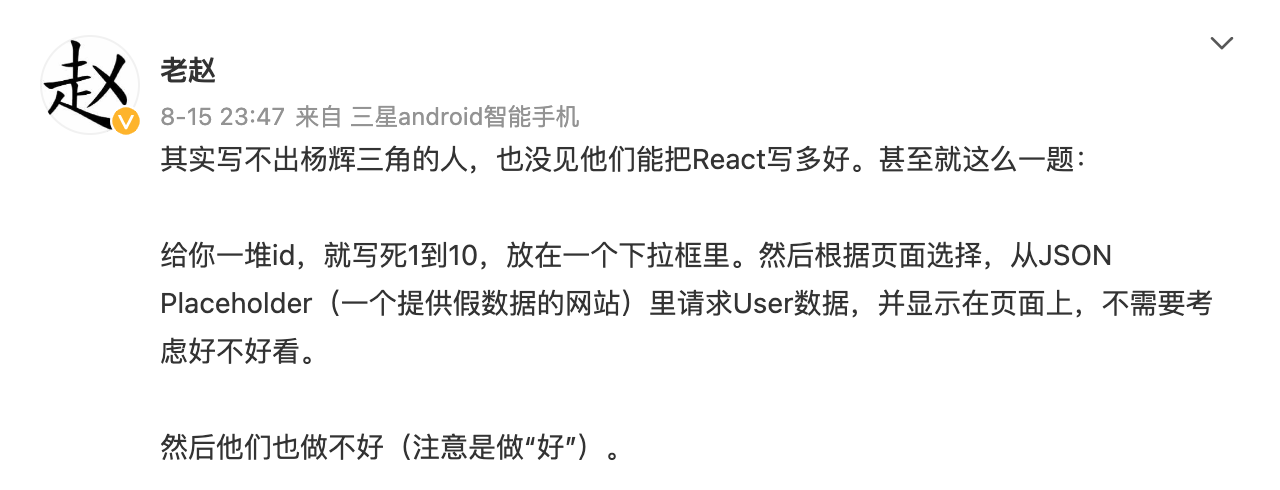
几个月前刷微博,看到老赵的一条,感同身受。
老赵也给出了评分标准,满分10分:
- 基本实现无误(4分)
- 显示 loading 字样(1分)
- 合理错误捕捉(1分)
- 知道在切换选择后取消未完成的请求(2分)
- 做 debounce 或 trottle(1分)
- 处理好各种情况之间的时序问题(1分)
基本实现无误比较笼统,具体还有几点要考虑
- 初始值
- 选中状态
小白或者初级工程师基本上能写出来下拉、发请求、展示请求结果,会忽略 选中状态、loading、取消请求等。
中级工程师大多也会遗漏取消请求、debounce、时序问题。
评分标准其实就对应了一次完整交互动作的 n 个状态,实现一个好的交互组件,我们需要仔细想一下交互过程中的状态,才能完整的处理每个过程。
以题目来说,这个组件是
1
2
3
4
5
6
7
8
9
10
11
12
13
14
15
16
|
const Component: React.FC = () => {
const [userInfo, setUserInfo] = React.useState('无数据');
return <>
<select>
{new Array(10).fill(1).map((, index) => {
return <option
key={index} // 很多人也容易忘记设置 key
value={`${index}`}>
{index}
</option>
})}
</select>
{userInfo}
</>;
};
|
接下来我们往组件上添加状态
加初始值
我们需要定义好当前的选中值,才能依此来发请求、标记选中状态、取消其它发出的请求。
注意 html option tag 的 value 只能是字符串。
1
2
3
4
5
6
7
8
9
10
11
| // Component.tsx
const Component: React.FC = () => {
const [userInfo, setUserInfo] = React.useState('无数据');
+ const [value, setValue] = React.useState<string>();
+ const onChange = event => {
+ setValue(event.target.value);
+ };
+
return <>
- <select>
+ <select onChange={onChange}>
|
加 disabled、loading 状态、选中状态
disabled 状态就是 loading=true 的情况。
1
2
3
4
5
6
7
8
9
10
| // Component.tsx
const Component: React.FC = () => {
+ const [loading, setLoading] = React.useState(false);
const [userInfo, setUserInfo] = React.useState('无数据');
const [value, setValue] = React.useState<string>();
const onChange = event => {
setValue(event.target.value);
};
return <>
|
选中状态就是当前值等于 option value,当前值是string,index是number,判断相等要做类型转换。
1
2
3
4
| return <option
key={index} // 很多人也容易忘记设置 key
+ selected={+value === index}
value={`${index}`}>
|
接下来就是发请求了,要注意 loading、abort 状态
1
2
3
4
5
6
7
8
9
10
11
12
13
14
15
16
17
18
19
20
21
22
23
24
25
26
27
28
29
30
31
32
33
34
35
36
37
38
| // Component.tsx
const Component: React.FC = () => {
const [loading, setLoading] = React.useState(false);
const [userInfo, setUserInfo] = React.useState('无数据');
const [value, setValue] = React.useState<string>();
const onChange = event => {
setValue(event.target.value);
};
+ const doFetch = (userId: string) => {
+ const abort = new AbortController();
+ setLoading(true);
+ // 传递 abort 信号
+ fetch(`url?userId=${userId}`, { signal: abort.signal })
+ .then(res => {
+ setUserInfo(res.data);
+ })
+ .catch(err => {
+ setUserInfo(err.message);
+ })
+ .finally(() => {
+ setLoading(false);
+ });
+ // 最后将 abort 控制器返回出去,以便取消请求
+ return abort;
+ };
+
+ // 使用 useEffect 监听 value 变化发送请求
+ // 同时取消上一次正在发送的请求
+ React.useEffect(() => {
+ const abort = value && doFetch(value);
+ return () => {
+ // 若请求很迅速,abort 不会做任何事
+ if (typeof abort === 'function') abort();
+ };
+ }, [value]);
return <>
<select onChange={onChange}>
|
再给展示内容加上 loading 信息
1
2
3
4
| </select>
- {userInfo}
+ {loading ? '正在加载...' : userInfo}
</>;
|
至此这个定制组件就很完整了,其中忽略了 userInfo 的类型,当它是 string,若实际情况是 object 的话,也要做相应处理。
想要进一步抽象为通用组件,还需要将
- option 列表
- fetch url 甚至是 doFetch function
等作为 props 传递给组件,还要考虑 option 的内容溢出、title 等。
完整代码
1
2
3
4
5
6
7
8
9
10
11
12
13
14
15
16
17
18
19
20
21
22
23
24
25
26
27
28
29
30
31
32
33
34
35
36
37
38
39
40
41
42
43
44
45
46
47
48
49
50
|
const Component: React.FC = () => {
const [loading, setLoading] = React.useState(false);
const [userInfo, setUserInfo] = React.useState('无数据');
const [value, setValue] = React.useState<string>();
const onChange = event => {
setValue(event.target.value);
};
const doFetch = (userId: string) => {
const abort = new AbortController();
setLoading(true);
fetch(`url?userId=${userId}`, { signal: abort.signal })
.then(res => {
setUserInfo(res.data);
})
.catch(err => {
setUserInfo(err.message);
})
.finally(() => {
setLoading(false);
});
return abort;
};
React.useEffect(() => {
const abort = value && doFetch(value);
return () => {
if (typeof abort === 'function') abort();
};
}, [value]);
return <>
<select>
{new Array(10).fill(1).map((, index) => {
return <option
key={index} // 很多人也容易忘记设置 key
selected={+value === index}
value={`${index}`}>
{index}
</option>
})}
</select>
{loading ? '正在加载...' : userInfo}
</>;
};
|
希望本文能帮助你写出更完整的交互组件。